



What’s new in version 1.0.1
Added more languages.
Description
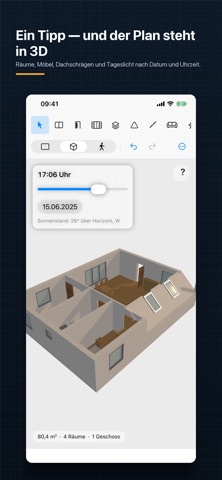
FloorStudio is a floor plan editor for iPhone, iPad and Mac. Draw walls to the centimeter, add doors and windows, furnish rooms — and see the same model instantly in 3D or walk through it at eye level. PRECISE DRAWING • Walls with snap points, angle grid and exact length input • Dimensions as interior, exterior or wall-center — entering 2.90 m means 2.90 m clear width • Automatic exterior and per-room dimensioning, plus custom dimension chains • Room detection with areas, names and total living space DOORS AND WINDOWS • Door types: single, double, sliding, folding, doorway • Window types: window, double window, floor-to-ceiling, panoramic, fixed glazing • Place skylights directly in sloped roofs • Everything snaps while placing: wall center, grid, symmetric or flush with the neighboring element FURNISHING • Furniture catalog for living, bedroom, kitchen, bathroom, office, kids' room, outdoor • Electrical symbols, structural elements, stairs, labels • Collision and clearance check warns about furniture in a door's swing path 3D AND WALKTHROUGH • One tap and the floor plan stands as a model — with walls, furniture and sloped roofs • Daylight by date, time and north direction • Walkthrough at eye level: walk, look around, open and close doors • WASD and mouse on Mac, joystick on iPad and iPhone MULTIPLE FLOORS • As many floors as you like, with the floor below shown faded as reference • Import a reference image and trace it to scale EXPORT • PDF at scales from 1:20 to 1:200, with title block and scale bar • PNG, JPEG and SVG • USDZ for Quick Look and AR • Print directly from the app YOUR DATA STAYS YOURS • No account, no registration, no ads, no tracking • Everything lives as a file on your device, optionally in iCloud Drive • Works fully offline